The weekly report shows 40 minutes of idle time for your best analyst. Your first instinct may be to ask what happened. Before you do, it helps to know exactly how a time tracker decides that someone is idle, because the label describes the computer's input, not the person's effort. Read correctly, idle time is a useful signal about forgotten timers and work patterns. Read carelessly, it damages trust.
How idle time is measured
Most time trackers mark a period as idle when there has been no keyboard or mouse input for a set number of minutes while the timer is running. Pedinno Time Tracker, for example, records whether there was keyboard or mouse input in each second, counting only, never which keys or where. In the configuration shown in its Privacy tab, an employee becomes idle after five minutes without input.
Idle time is therefore the absence of input, not the absence of work. The tracker cannot see whether the person is reading, thinking, on a phone call or sketching on paper.
Common reasons for legitimate idle time
Roles differ greatly. A data-entry operator will naturally show less idle time than a manager who spends half the day on calls. Comparing idle percentages across different roles tells you more about the roles than about the people.
- Reading a long document, contract or code review on screen.
- Phone calls, video calls without typing, and in-person discussions.
- Planning or solving a problem on paper.
- Watching a training video or a client demo.
- Waiting for a long upload, build or report to finish.
When idle time is worth a conversation
Idle time becomes meaningful as a pattern, not a single number. A timer left running through lunch every day, long idle stretches at the end of the day, or idle time that grows week after week alongside missed deliverables are worth discussing. Start the conversation with curiosity: perhaps the employee needs a clearer way to log calls, or forgot how to pause the timer.
Idle, breaks and pauses are different things
Good tracking separates three states. A break is time the employee deliberately marks as a break. A pause stops tracking altogether. Idle is time when the timer is running but no input arrives. Keeping these apart lets employees show that they took a proper lunch rather than having it appear as unexplained idle time, and it lets managers spot forgotten timers without guessing.
How Pedinno reports idle time
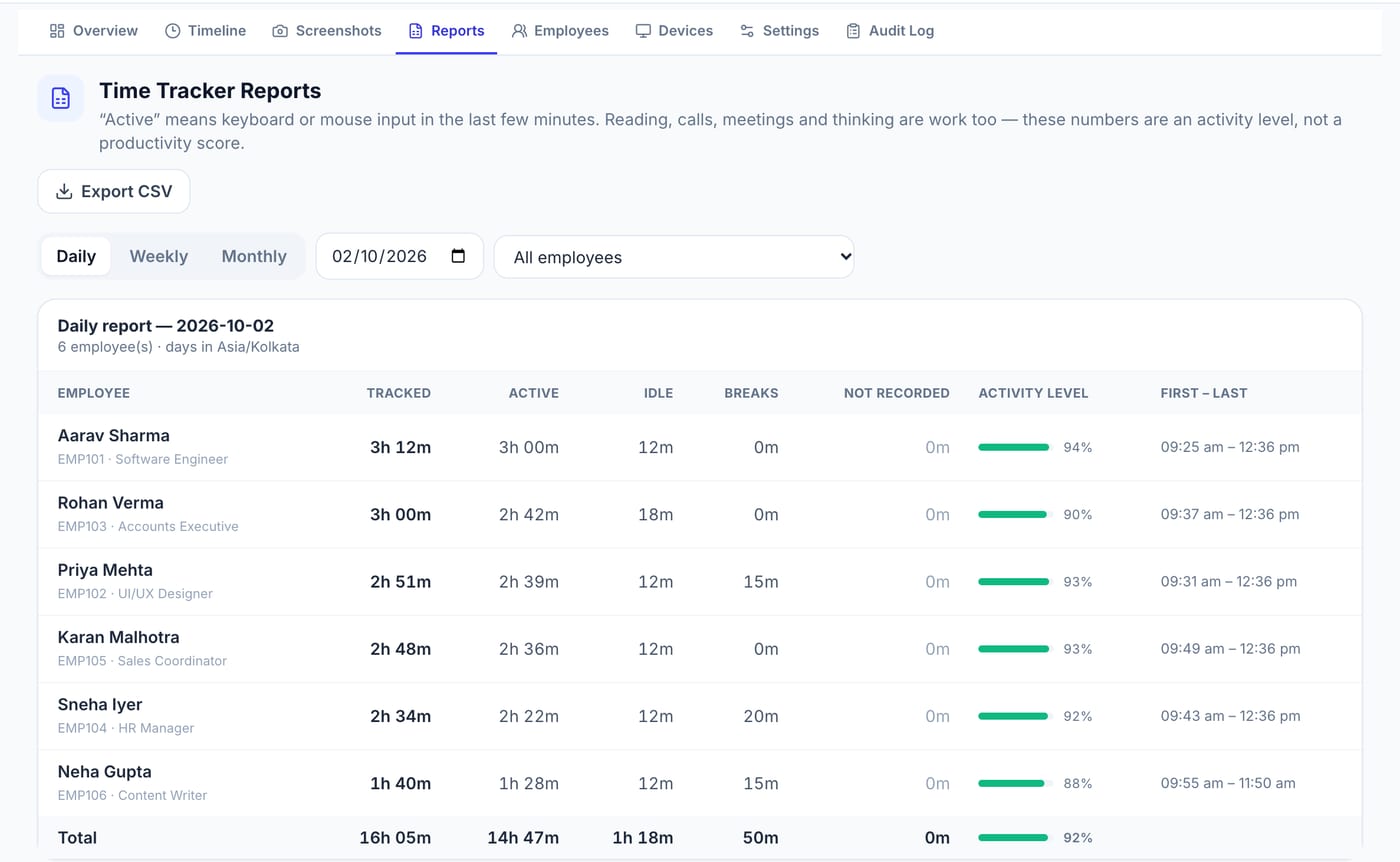
Pedinno Time Tracker shows each employee as tracking, idle, on a break, paused or not responding in a live overview. Daily, weekly and monthly reports list tracked, active, idle and break time separately, along with an activity level and the first and last recorded times of the day. The reports carry a reminder that reading, calls, meetings and thinking are work too, and that the activity level is not a productivity score.
Set a team rule for idle time
Write down how idle time is treated before you roll out tracking. For example: idle time is not deducted automatically, employees pause the timer for personal breaks, and calls away from the computer are noted in the daily work log. A rule like this turns idle time from a source of suspicion into a routine data point.
Frequently asked questions
Does idle time mean the employee was not working?
No. It means there was no keyboard or mouse input for a period while the timer ran. Reading, calls and thinking all produce idle time.
Should idle time be deducted from salary?
Not automatically. Agree a policy, review patterns with the employee and decide exceptions through your normal attendance approval process.
Is idle time recorded when the timer is paused?
In Pedinno, nothing is recorded while the timer is paused or stopped.
See Time Tracker in action
Transparent time tracking for Windows, macOS and Android — timers, activity levels, timelines, optional screenshots and daily, weekly and monthly reports.
Review a sample daily report together and agree how your team should treat idle, break and paused time.
Explore Employee Time Tracker