Pedinno Apps for Every Role — on Android, iOS, Windows and macOS
Staff, students, parents, drivers and security guards each get an app built for their job, connected to the same Pedinno account and permissions.
Available on Google Play and the App Store
Purpose-built apps for every role — staff, students, parents, drivers and security guards — plus a desktop time tracker for Windows and macOS.

Pedinno AI — My Login
For staff & employeesStaff self-service app: face recognition attendance, GPS check-in, leave, claims, payslips, tasks and approvals — plus role-based access to the modules you manage.
- Face & GPS attendance
- Leave, claims & payslips
- Tasks & approvals
- Module access by role
Pedinno Student & Parent
For students & parents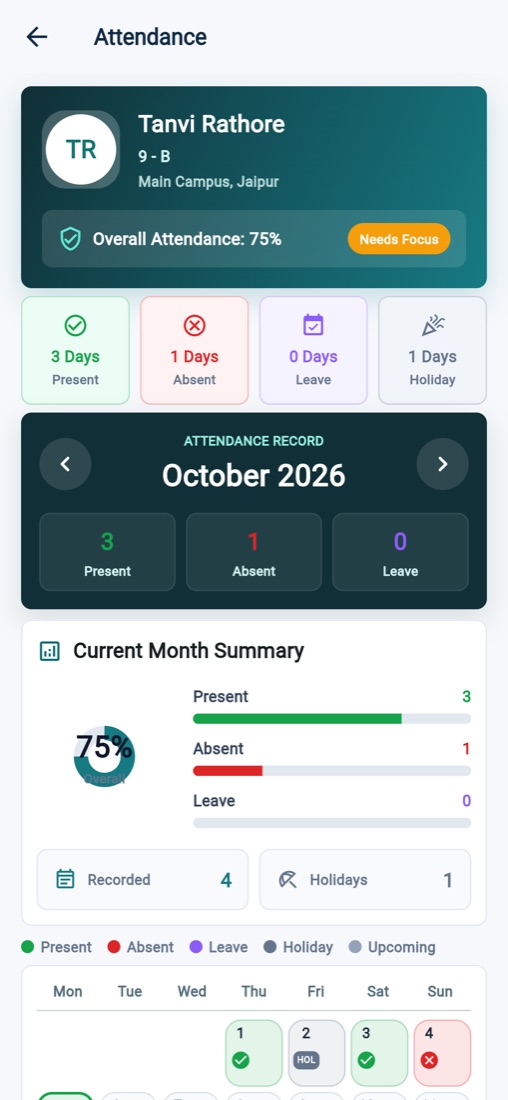
One app for students and parents to track attendance, fees, homework, results, notices and the school bus — all in one place.
- Attendance & leave
- Fees & receipts
- Homework & results
- Live bus tracking
Transport — Pedinno
For drivers & transport staffSchool transport app for live trip tracking, assigned routes and stoppages, and student pickup and drop updates for parents.
- Live trip tracking
- Route & stop mapping
- Pickup / drop updates
- Secure staff access
Pedinno Gatepass
For security guardsGuard app for fast visitor, staff and student check-in and check-out — search, scan a QR or identify by face. Keeps working offline.
- QR & face identification
- Approvals & availability
- Works offline
- Encrypted on-device data
Pedinno Time Tracker
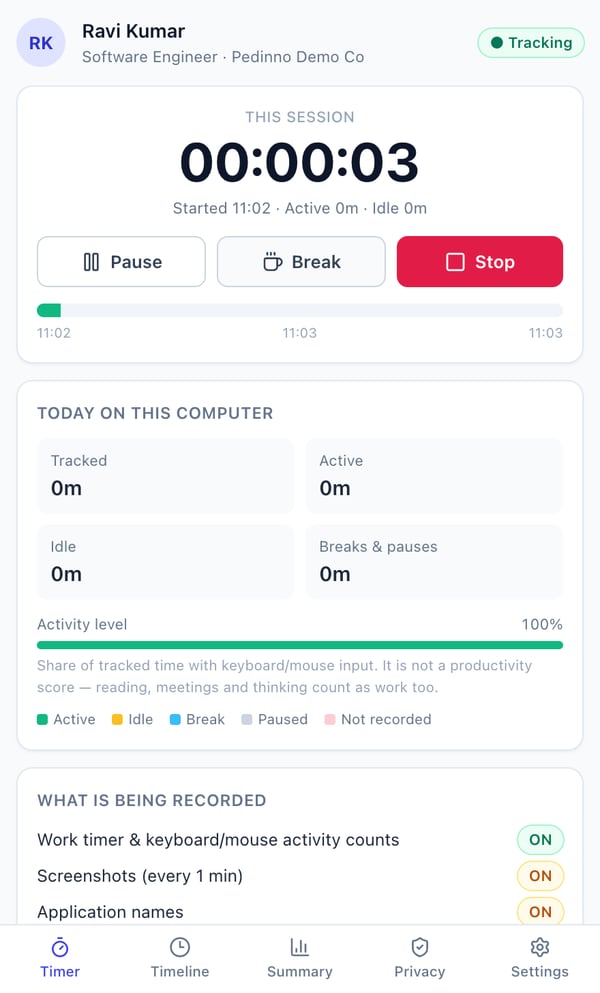
Windows & macOSEmployees start, pause and stop a work timer and always see what is being recorded. Admins get live status, timelines, activity levels and daily, weekly and monthly reports.
- Start / pause / break timer
- Activity level (not keystrokes)
- Optional screenshots & app names
- Transparent privacy tab
Download Pedinno Time Tracker
Install on each employee's computer. Time, activity and reports flow straight into your Pedinno workspace.
Download Pedinno Time Tracker
For organisations whose Pedinno workspace includes Time Tracker. Your admin enrols you on the staff record, then you sign in with the same mobile number or email.
No Pedinno workspace yet? Start 10-Day Free Trial
Real Pedinno App Screens
Actual screens from the Pedinno web app and mobile app, captured on a demo school with fictional students and staff.
Every Way Your People Need to Connect
Browser, phone, desktop, face, fingerprint, QR, GPS or WhatsApp — one account and one set of permissions across all of them.
 Pedinno Cloud
Web Admin Portal
Full ERP in any modern browser — no installation, works on desktop, laptop and tablet.
Android & iOS Apps
Dedicated apps for staff, students & parents, transport drivers and security guards.
Desktop Time Tracker
Windows and macOS app for timers, activity levels, timelines and optional screenshots.
Face Recognition
Mark attendance or identify visitors with a face scan from the mobile app.
Biometric Machines
ZKTeco, eSSL, Mantra and other iClock / ADMS devices push punches automatically.
GPS & Geofence
Location-verified attendance and staff tracking for field teams and project sites.
QR Codes
QR-based gatepass check-in, app connection, ID card and certificate verification.
OTP & Secure Login
Mobile OTP or password sign-in with role-based permissions and device control.
Notifications, reminders, chatbot and two-way conversations on the official Cloud API.
Self-Service Portals
Client, vendor, student and channel-partner portals with their own secure logins.
Pedinno Apps — Frequently Asked Questions
Yes. The apps are free to download. Users sign in with the account their school or employer has created for them in Pedinno.
Use the mobile number or email on your staff record with OTP or password. Your organisation's administrator controls which modules you can see.
Yes. When the school uses Pedinno Transport, parents see live pickup and drop trips in the Student & Parent app.
Yes. The guard app keeps working without internet and syncs check-ins and check-outs when the connection returns.
Pedinno Time Tracker is available for Windows & macOS. The full ERP also runs in any modern web browser — no installation needed.
Get Your Team on the Pedinno Apps
We help you set up branches, roles and logins so staff, parents and guards can start using the apps on day one.