Your manager has asked everyone to install a time tracking app, and the questions start immediately. Can they see what I type? Can they read my messages? Will they know if I check my bank balance at lunch? The honest answer is that it depends on the app and on the settings your organisation chooses. This guide explains what time trackers commonly record, what you can check yourself and what to ask your employer.
What most time trackers record
Nearly every time tracker records when you start and stop work and the total hours. Many also record an activity level, which is usually a count of how often the keyboard or mouse was used, not what was typed. Some record which application is in front, some take screenshots at intervals, and a few record websites.
The difference between a respectful tracker and an intrusive one lies in those optional features and in whether you are told about them.
Questions to ask your employer
A reasonable employer will answer these in writing. Under India's data protection law, organisations are expected to tell people what personal data they process and why.
- Which features are switched on: activity level, app names, screenshots?
- Does the tracker run only while my timer is on?
- Who can see my records?
- How long are records kept?
- How do I correct a mistake, such as a forgotten timer?
- Is the tracker installed only on company devices?
What you can check yourself
Open the app and look for a privacy or settings screen that lists what is recorded. Check whether there is an indicator, such as a tray icon, that shows when optional features like screenshots are active. Read your organisation's monitoring or IT policy. If something seems unclear, ask HR rather than guessing.
What Pedinno Time Tracker records
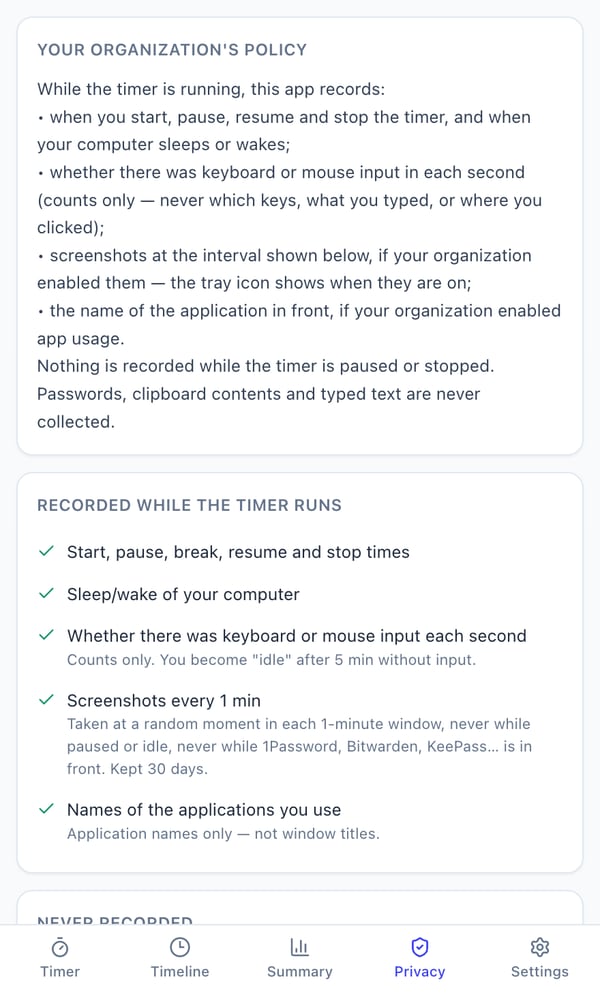
If your organisation uses Pedinno Time Tracker, while your timer runs it records start, pause, break, resume and stop times, sleep and wake of your computer, and whether there was keyboard or mouse input in each second, as counts only. Screenshots and the name of the application in front are recorded only if your organisation enables them, and the Privacy tab shows you which are on. It never records typed text, key sequences, passwords, clipboard contents, URLs, camera, microphone or location, and nothing is recorded while your timer is paused or stopped.
Good habits for working with a tracker
Pause or use break when you step away for personal time, and stop the timer when your day ends. Do personal tasks such as online banking on a personal device or while the timer is paused. If you spend long periods reading or on calls, mention it to your manager so idle time is understood. A transparent tracker can also protect you: it gives you a record of extra hours and late evenings that might otherwise go unnoticed.
Frequently asked questions
Can my employer see what I type through a time tracker?
That depends on the software. Pedinno Time Tracker never records typed text, keys or passwords; it counts only whether there was input.
Can my employer see my screen?
Only if screenshots are enabled. In Pedinno they are off by default and you can see the setting in the Privacy tab.
Does the tracker record anything when the timer is off?
In Pedinno, nothing is recorded while the timer is paused or stopped.
See Time Tracker in action
Transparent time tracking for Windows, macOS and Android — timers, activity levels, timelines, optional screenshots and daily, weekly and monthly reports.
Employers can ask for the employee Privacy tab to be shown during the demo so staff questions are answered up front.
Explore Employee Time Tracker