The fastest way to make a team distrust time tracking is to install it on a Monday with a one-line email. The software may be perfectly reasonable, but people fill the silence with the worst assumptions. A good rollout takes a couple of weeks, answers questions before they are asked and gives employees a reason to see the tool as fair.
Step 1: decide the purpose and write the policy
Write one paragraph on why you are introducing tracking: accurate payroll, fair overtime, client billing or visibility for a remote team. Then list what will be recorded, what will not, who can see reports, how long data is kept and how corrections work. Keep it to one page. If you cannot explain the purpose simply, revisit whether you need tracking at all.
Step 2: choose settings to match the purpose
Switch on only the features the purpose needs. For attendance and workload, timer events and activity counts are usually enough. Leave screenshots and application tracking off unless you have a specific, explained reason.
Step 3: tell the team before installation
Announce the change at least a week before installation, ideally in a team meeting followed by an email. Leave time for questions. Here is a sample announcement you can adapt:
- "From [date], we will use [tool] to record working time on company laptops."
- "Why: to make payroll and overtime accurate and to give remote colleagues a fair, shared record of their hours."
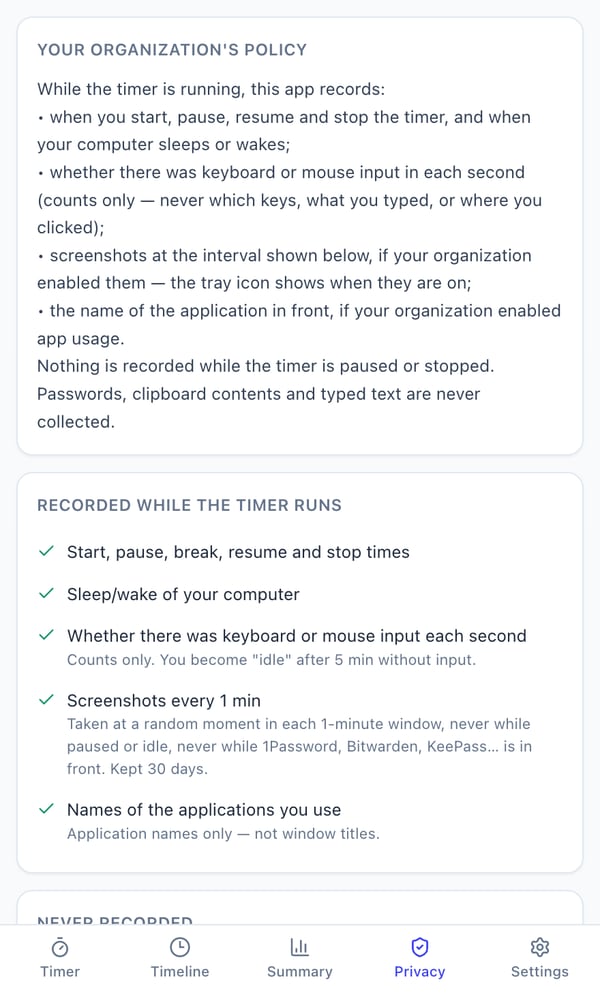
- "What it records while your timer is on: start, pause, break and stop times and whether there was keyboard or mouse input. It does not record what you type, your passwords, websites or your camera."
- "Screenshots are switched off."
- "Only [roles] can see reports. You can see your own record and the privacy settings in the app at any time."
- "If you forget to stop the timer, tell [person] by the next working day and we will correct it."
Step 4: pilot with volunteers
Run one or two weeks with a small group that includes different kinds of work: someone on calls, someone doing focused desk work, someone in meetings. Ask what was confusing. Adjust the policy, for example on how calls away from the computer are noted, before rolling out to everyone.
Step 5: use the data the way you promised
Trust is built in the first month. Use reports for the purpose you announced. Recognise overtime, rebalance overloaded people and fix process issues the data reveals. If a manager uses the first week's idle time to criticise someone, the rollout will be undone.
How Pedinno makes the rollout easier
Pedinno Time Tracker is built around transparency. Employees install it from the Microsoft Store, the macOS installer or Google Play, sign in with the mobile number or email on their staff record, and can always see what is recorded in the Timer and Privacy tabs. Screenshots and app names are off by default. A three-minute training video on the product page walks through signing in, tracking time and reading reports, which you can share with the team before day one.
Frequently asked questions
How much notice should we give before introducing time tracking?
At least a week, with a meeting and a written policy. Allow time for questions and a short pilot.
Should managers be tracked too?
Applying the same rules to managers who do similar work makes the policy feel fair and shows that it is not a tool aimed at one group.
Is there a training video for employees?
Yes. Pedinno has a three-minute training tutorial covering sign-in, tracking time and reports.
See Time Tracker in action
Transparent time tracking for Windows, macOS and Android — timers, activity levels, timelines, optional screenshots and daily, weekly and monthly reports.
Bring your draft announcement and review it against the Pedinno Privacy tab so the wording matches the settings exactly.
Explore Employee Time Tracker