Every Friday the same reminder goes out, and every Monday the same people still have not submitted their timesheets. HR escalates to managers, managers escalate to the team, and the data that finally arrives is a rough guess. When most of a team struggles with timesheets, the cause is rarely laziness. It is a process that asks people to do extra work with no visible benefit to them.
Why people skip timesheets
Each of these has a different fix. Ask a few team members which ones apply before changing anything.
- Filling the sheet takes time that feels like unpaid admin.
- Nobody can remember accurately what they did on Tuesday.
- The format is confusing, with too many codes or columns.
- Employees never see the timesheet used for anything that helps them.
- There is fear that the data will be used against them.
Make recording effortless
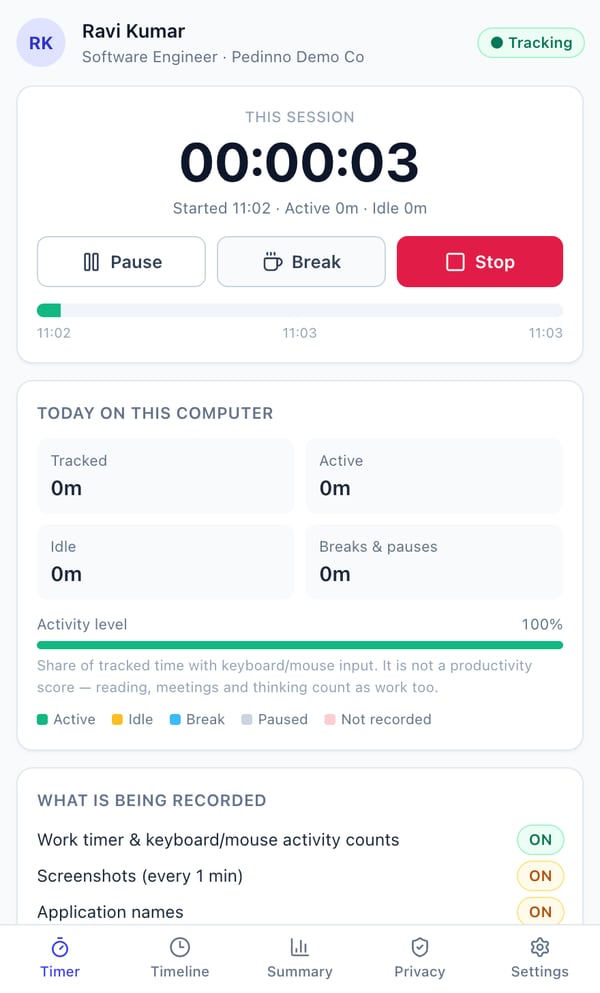
The most effective change is to stop asking people to recreate the week from memory. A timer that runs while they work captures the total automatically. Employees only need to start it, pause for personal time and stop it at the end of the day. That turns a 20-minute weekly chore into a few clicks a day.
Show employees what is in it for them
Timesheets get completed when they protect the employee: overtime is recognised, workload problems become visible, and disputes about hours are settled with facts. Say this explicitly, and then act on it. When a report shows someone working long hours every week, a manager who rebalances the workload earns more cooperation than any reminder email.
Set a clear rhythm and keep it light
Agree one simple routine: start the timer at the beginning of the day, use break for lunch, stop at the end, and fix any mistake by the next working day. Managers review the weekly report every Monday. If an exception appears, the employee explains it once and the record is corrected through the normal approval route.
How Pedinno removes the weekly chase
With Pedinno Time Tracker, employees use a desktop app on Windows or macOS, or the Android app, with start, pause, break and stop buttons. The app shows exactly what is being recorded, and the Privacy tab lists the organisation's policy. Managers see live status and daily, weekly and monthly reports without collecting files from anyone. Because the record is built during the day, there is nothing to submit at the end of the week.
Measure the change
Before switching, note how many reminders were sent and how many timesheets were late over the last month. After four weeks with the new process, compare again, and ask the team whether recording time feels easier. The goal is complete records with less effort on both sides.
Frequently asked questions
Should we penalise employees who submit timesheets late?
Fix the process first. If recording is effortless and useful, late submission usually drops sharply. Penalties on a broken process mostly produce inaccurate data.
Do employees still need to write what they worked on?
If you bill clients or track projects, a short daily work log alongside the timer gives you the breakdown. For attendance-only needs, the timer is often enough.
Which devices does Pedinno Time Tracker support?
Windows 10 and 11, macOS 12 or later on Apple silicon and Intel, and Android phones.
See Time Tracker in action
Transparent time tracking for Windows, macOS and Android — timers, activity levels, timelines, optional screenshots and daily, weekly and monthly reports.
Ask the team to walk through one employee's day from starting the timer to the manager's weekly report.
Explore Employee Time Tracker